
Guide to Cam2Cam Private Sessions for Beginners
Booking your first cam2cam private session can feel uncertain. Here’s what you need to know: a cam2cam private show is a paid, one-on-one video chat where both you and the performer have cameras on. You’re billed per minute or in tokens, and you can book one in minutes by selecting a performer, testing your camera, setting a budget, and following the process outlined below.
This guide comes from SexCamFun editors who regularly review how private cam sessions work from start to finish. If you’re new to this, feeling nervous is normal. Let’s walk through it.
What Is a Cam2Cam Private Session?
A cam2cam private show is a one-on-one paid chat where both cameras are active. The performer sees your real-time reaction instead of just reading typed messages – that’s the key difference from a standard private show where only the performer broadcasts. It’s also distinct from free public chat, where dozens of viewers watch the same stream and tip to request specific actions. It differs too from a spy show, where you watch someone else’s already-running private without interacting, and from a group show, where several paying viewers share one session and split the performer’s attention.
Here’s a quick reference for terms you’ll encounter:
| Term | What it means |
|---|---|
| Cam2cam | Two-way video and audio; the performer sees you too |
| Private session / private show | A one-on-one paid chat, camera direction varies |
| Exclusive private | A private where no one else can spy or join |
| Tokens / credits | The platform’s currency, purchased in bundles, spent per minute or per tip |
| Token balance | Your remaining spendable credits before a top-up is needed |
| Per-minute rate | What the performer charges for each minute of private time |
| Session timer | The visible countdown or running clock tied to your balance |
| Tipping menu | A list of requests with token costs the performer has set |
| Performer menu | The broader list of what a performer offers in and out of private |
If you haven’t set up your webcam and microphone yet, do that first. The SexCamFun webcam-to-webcam basics guide covers free setup so this article stays focused on the private-session experience itself.
Step 1: Shortlist the Right Performer for a Private Show
Picking the right performer before you pay anything prevents an awkward, expensive mismatch. Treat it like vetting a contractor, not swiping through a dating app.
How First-Timers Actually Search for Performers
Across SexCamFun, first-timers browsing before opening a private session overwhelmingly filter by category first: body type, language spoken, and specific interests or kinks come before anything else. Only after narrowing by category do most users check whether the performer is currently online and what their per-minute rate is. This order matters. If you scroll an unfiltered list of everyone online, you’ll spend more time second-guessing and more tokens testing the waters than if you filter first and compare a short list second.
A Simple Shortlisting Checklist
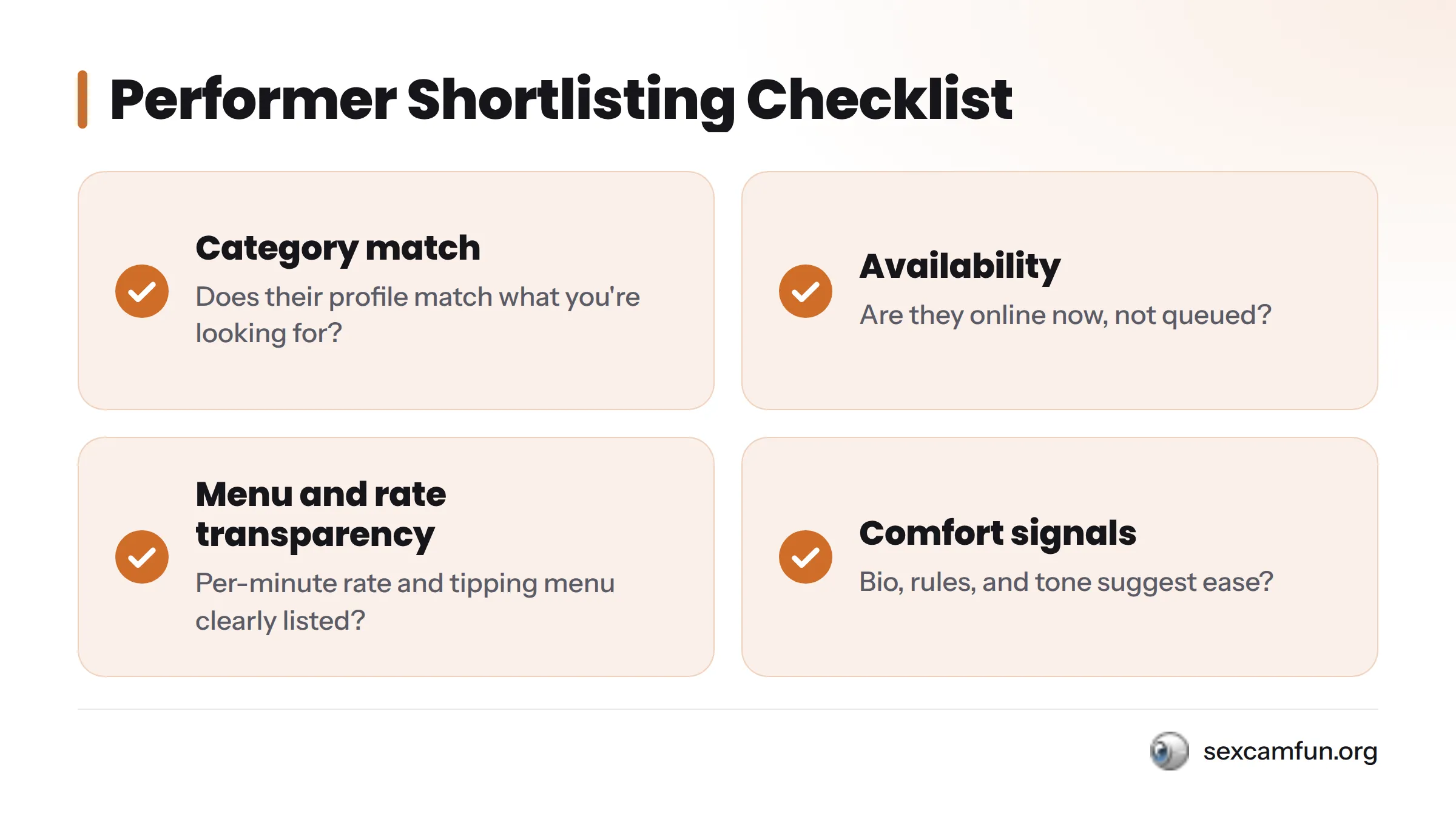
Run any performer through these four checks before you commit tokens to a private:
- Category match – Does their profile and recent activity match what you’re looking for, not just a tag?
- Availability – Are they online now, or will you be paying to wait in a queue?
- Menu and rate transparency – Is their per-minute rate and tipping menu clearly listed, without vague “ask me” pricing?
- Comfort signals – Do their bio, rules, and public chat tone suggest someone you’ll feel at ease with?
If a performer checks all four boxes, you’re ready to move forward. Start browsing with this filter mindset on SexCamFun’s private HD cams, where categories and live status are visible before you ever spend a token.
Step 2: Check Your Cam2Cam Setup Before You Pay
Nothing kills a private session faster than discovering your camera doesn’t work after the meter has already started running.
Webcam, Audio, and Browser Permissions
Before you click into a private, confirm your browser has camera and microphone permissions enabled for the site. Most browsers show a small camera icon in the address bar when a site requests access; click it and select “allow” rather than “block.” Test your video preview if the platform offers one. If you’re on a laptop, check that an external webcam isn’t being blocked in favor of a built-in one you didn’t intend to use. For full hardware and browser setup details, the SexCamFun webcam-to-webcam basics page covers it step by step so you don’t troubleshoot while a timer is running.
Token Balance and Budget Planning
Check your token balance before you enter a session, not halfway through. A private session runs for as long as your balance covers the performer’s per-minute rate, and running out mid-conversation is an awkward way to end things.
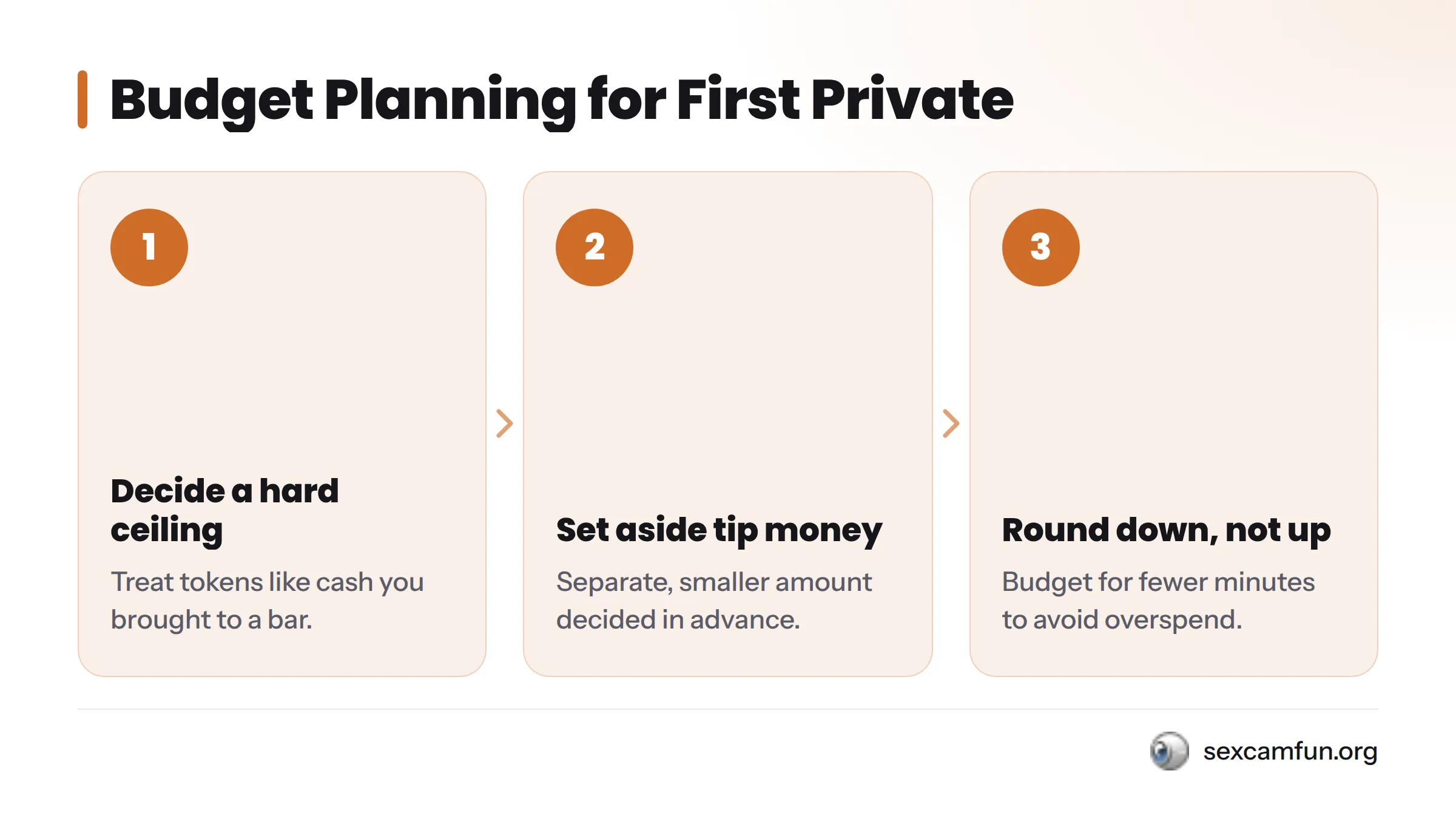
A practical budget framework for first-timers:
- Decide a hard token ceiling before you start, treating it like cash you brought to a bar.
- Set aside a separate, smaller amount for tips decided in advance rather than improvised in the moment.
- Round down, not up. If you can comfortably afford 20 minutes, budget for 15 so a slow-loading page or a few bonus tips don’t catch you off guard.
Rates vary by performer and platform, so there’s no universal number to plan around. Treat your first private session as a short test run, not the main event.
Step 3: Enter the Private Session and Set Expectations
What Happens in the First 60 Seconds
Once you confirm the private request and the performer accepts, your camera feed typically goes live within a few seconds, the session timer and billing start, and tokens begin deducting from your balance. Most performers open with a greeting and a quick check that your audio and video are coming through. Say hello back, confirm you can see and hear each other, and mention anything specific you were hoping to see or talk about.
Communicating What You Want (and Don’t Want)
Say what you want in plain, direct language early rather than hinting and hoping. Performers aren’t mind readers, and private sessions move faster than slow-burn conversations. It’s equally fine, and expected, to say what you don’t want. A quick “let’s skip that” is normal and respected.
If your feed lags or freezes, say so immediately rather than staying quiet and wasting paid minutes. Refreshing the page usually reconnects the session without losing your timer, though some platforms may end the private if the connection drops, so flag lag the moment you notice it. If the performer misreads a request, restate it plainly once rather than repeating it with growing frustration.
Step 4: Cam2Cam Etiquette During the Show
Consent and Respect Guidelines
A private session is still a negotiation between two people, even though one side is paying:
- Anything in a performer’s bio or rules as off-limits stays off-limits – no exceptions and no pushing.
- A “no” during a session is final, not a starting point for negotiation.
- You can ask what a performer is and isn’t comfortable with. Asking shows respect.
- Recording or screenshotting a private session without explicit permission violates trust and platform terms.
- Staying off-camera for part or all of a cam2cam session is generally fine as long as you communicate that upfront. Most performers prefer knowing to wondering.
Directing Respectfully
Clear, calm direction gets better results than vague or demanding language. Think of it as guiding a scene you’re both shaping together, not giving orders.
| Do | Don’t |
|---|---|
| State requests clearly and early | Assume they’ll guess what you want |
| Check in if something seems off | Stay silent and hope it resolves |
| Respect listed limits without testing them | Push past a stated boundary |
| Tip to signal appreciation | Treat tipping as a bargaining chip for pressure |
| End with a simple thank-you | Vanish mid-sentence without a word |
Step 5: Tipping and Extending the Private Session
How Tipping Menus Work
Most performers keep a visible tipping menu listing specific actions or requests with token costs. Tipping during a private is optional on most platforms since you’re already paying per minute, but it’s a normal way to request something specific or show appreciation. If a performer uses interactive toys that respond to tips, the SexCamFun Lovense cam interactive toys guide explains how that works separately.
Extending Time Without Overspending
If you’re enjoying the session and want more time, most platforms let you extend before your balance hits zero, usually with a one-click “add time” or “add tokens” option. Decide your extension limit before the countdown gets low, rather than deciding when it’s easy to keep clicking “just five more minutes.” If your balance runs out mid-session, many platforms offer a short grace window to reload before disconnecting, but don’t count on it. Your original budget ceiling from Step 2 is your real stopping point.
Step 6: Ending the Session Gracefully
Signaling You’re Wrapping Up
Ending well matters as much as starting well. A simple approach works best:
- Give a short heads-up: “I need to head out in a minute or two.”
- Send a closing tip if you enjoyed the session and your budget allows.
- Say thank you, specifically if you can. “That was great, thank you” lands better than a silent exit.
- Close the session on your end rather than just closing the browser tab, if the platform gives you that option.
After the Session
Once it’s over, most platforms let you favorite or follow a performer so you can find them again without re-searching. If you want to revisit a moment from a show you enjoyed, some performers sell recordings of past sessions separately; the SexCamFun how to access recorded cam shows guide walks through how that works, since it’s a different purchase from a live private.
Private Session FAQs for First-Timers
What is a cam2cam private session, exactly? A paid, one-on-one video chat where both you and the performer have cameras on, so the interaction is two-way rather than one-way.
How is cam2cam different from a regular private show? In a regular private, only the performer’s camera is active. In cam2cam, your camera is live too, so the performer can see and react to you directly.
How is cam2cam different from a spy show or group show? A spy show lets you watch someone else’s already-running private without interacting. A group show splits one session among several paying viewers at once. Cam2cam is strictly one-on-one with two-way video.
How much should I budget for my first cam2cam session? Rates vary by performer and platform. Set a hard token ceiling before you start, decide tip money separately, and budget for fewer minutes than you think you can afford.
Do I need to pay extra for cam2cam on top of a regular private? On many platforms, cam2cam is either included in the private rate or carries a small additional charge. Check the performer’s listed rate before entering, since this varies by platform and performer.
What camera and microphone permissions do I need to enable? Your browser needs camera and microphone access allowed for the cam platform you’re using. Check the permission icon in your browser’s address bar and confirm your webcam preview is working before you pay.
What happens in the first minute after a private session starts? Your camera goes live, the session timer and billing start, and most performers open with a greeting and a quick audio and video check.
Is it okay to stay off-camera during a cam2cam session? Yes, as long as you tell the performer upfront so they’re not left wondering. Most performers are fine with it once they know.
How do I end a private session politely? Give a short heads-up that you’re wrapping up, send a closing tip if your budget allows, say thank you, and close the session properly rather than just closing the tab.
What’s the difference between free public chat and a paid private session? Free public chat is shared among many viewers with no guaranteed individual attention. A paid private, especially cam2cam, is one-on-one and billed by the minute or in tokens.
Free vs. Paid: Where Cam2Cam Fits
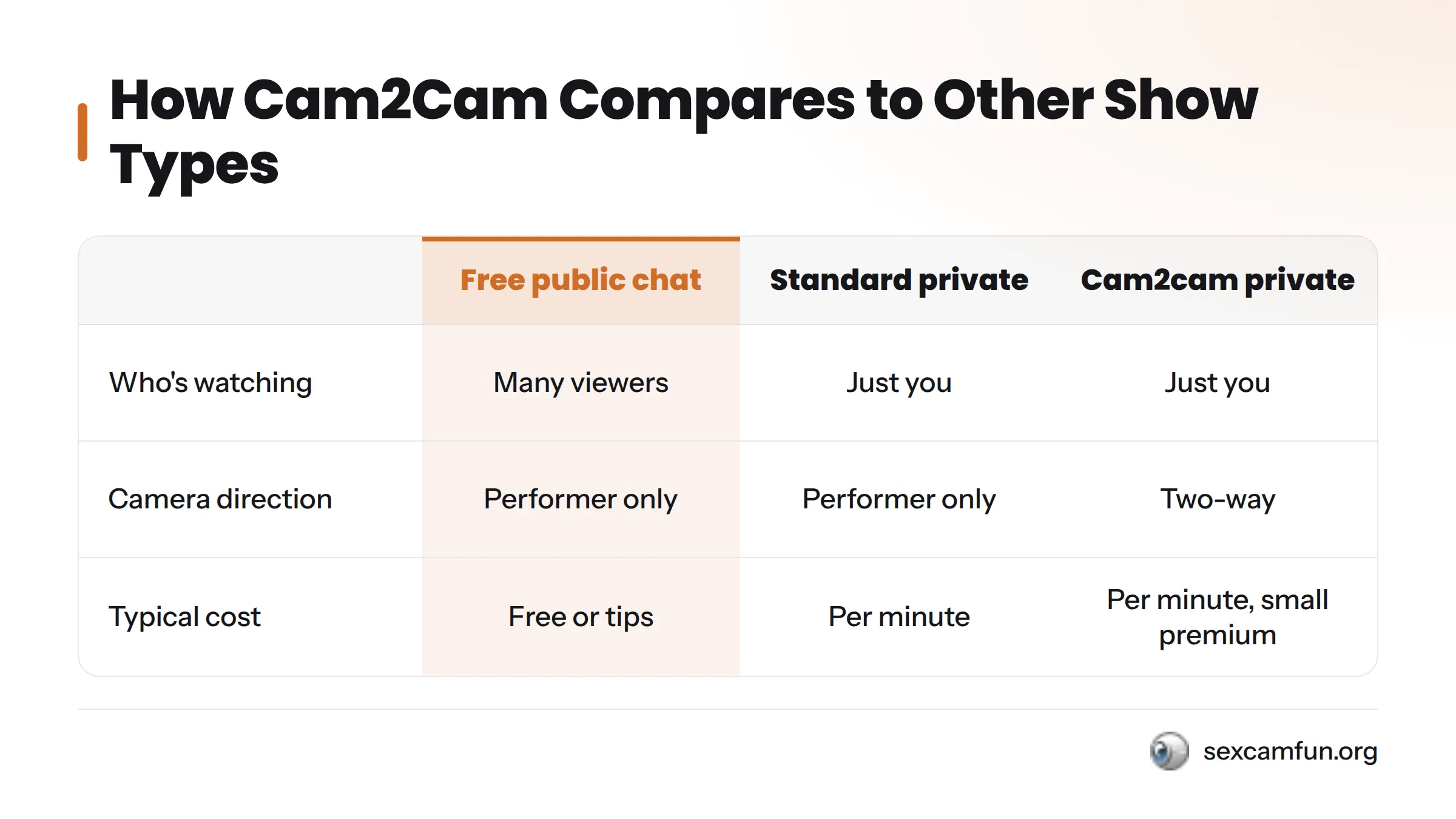
| Format | Who’s watching | Camera direction | Typical cost |
|---|---|---|---|
| Free public chat | Many viewers at once | Performer only | Free to watch, tips optional |
| Standard private show | Just you | Performer only | Billed per minute or in tokens |
| Cam2cam exclusive private | Just you | Two-way, both cameras on | Billed per minute or in tokens, sometimes a small premium over standard private |
If you’re still deciding whether a paid private is worth it compared to free chat, the SexCamFun free vs paid cam experiences guide breaks that decision down in more detail.
Ready for Your First Private
A first cam2cam session doesn’t need to be stressful once you know the sequence: shortlist by category and comfort signals, check your camera and set a token ceiling, say hello and set expectations in the first minute, direct respectfully, tip with intention, and close things out with a simple thank-you. That’s the whole playbook.
When you’re ready to put it into practice, SexCamFun is built for this first-timer experience, with transparent per-minute rates, visible tipping menus, and categories you can filter before you ever spend a token. Browse live performers, run them through the four-point shortlist above, and start your first private with a budget you set, not one that sets you.