
Lovense Cam: What It Is and How Interactive Toys Work
A Lovense cam is a live webcam show where the performer wears or uses a Bluetooth-connected Lovense toy that vibrates in response to viewer tips in real time. It’s not a product in itself – it’s a style of interactive broadcast built on Lovense’s toys, its Connect app, and a compatible cam platform working together.
That covers the basics, but the term gets confusing fast because “Lovense” appears attached to three different things: a toy brand, a software application, and a hardware webcam. This guide sorts out exactly what each one is, how the tip-to-vibration mechanic actually works, and what you need to know before joining an interactive show.
Understanding Lovense Cam Shows
A Lovense cam show is an interactive broadcast where the performer uses hardware and software from Lovense to connect a toy to the tip system. The performer wears the toy, links it through the Connect app, and viewers trigger vibration patterns by sending tips, usually through a tip menu displayed in the room.
This places Lovense cam shows in a broader category called teledildonics – internet-connected or remote-controlled sex toys that let one person’s action (a tip, a button tap, a slider movement) create a physical response in another person’s device, often across a distance. The term itself has roots in decades of tech writing about remote-controlled devices. Wikipedia’s entry on teledildonics offers a useful overview of how the category developed before Bluetooth toys brought it into mainstream use.
Here’s where confusion typically starts. Three distinct things share the Lovense name:
| Term | What it actually is |
|---|---|
| Lovense Webcam | A physical 4K hardware camera that Lovense sells for streaming, separate from any toy |
| Lovense Connect / Cam Extension | Free software (app and browser extension) that links a Lovense toy to a cam platform’s tip system |
| Lovense cam show | The live viewer experience: a performer broadcasting with a toy that reacts to tips |
Most people searching “Lovense cam” mean the third one. The webcam is just a camera. Connect and the Cam Extension are the software that bridges toy and platform. The “cam” that captures attention is the show itself – the moment a tip becomes a vibration the audience watches happen.
How Tip-to-Vibration Mechanics Work
The process is straightforward once you break it into steps. A viewer sends a tip, usually tied to a specific amount on a tip menu the performer set up beforehand. The Lovense Connect app or Cam Extension running on the performer’s device reads that tip amount. The software converts the tip into a vibration command and sends it to the toy over Bluetooth. The toy responds immediately, and the performer’s reaction is what the audience sees.
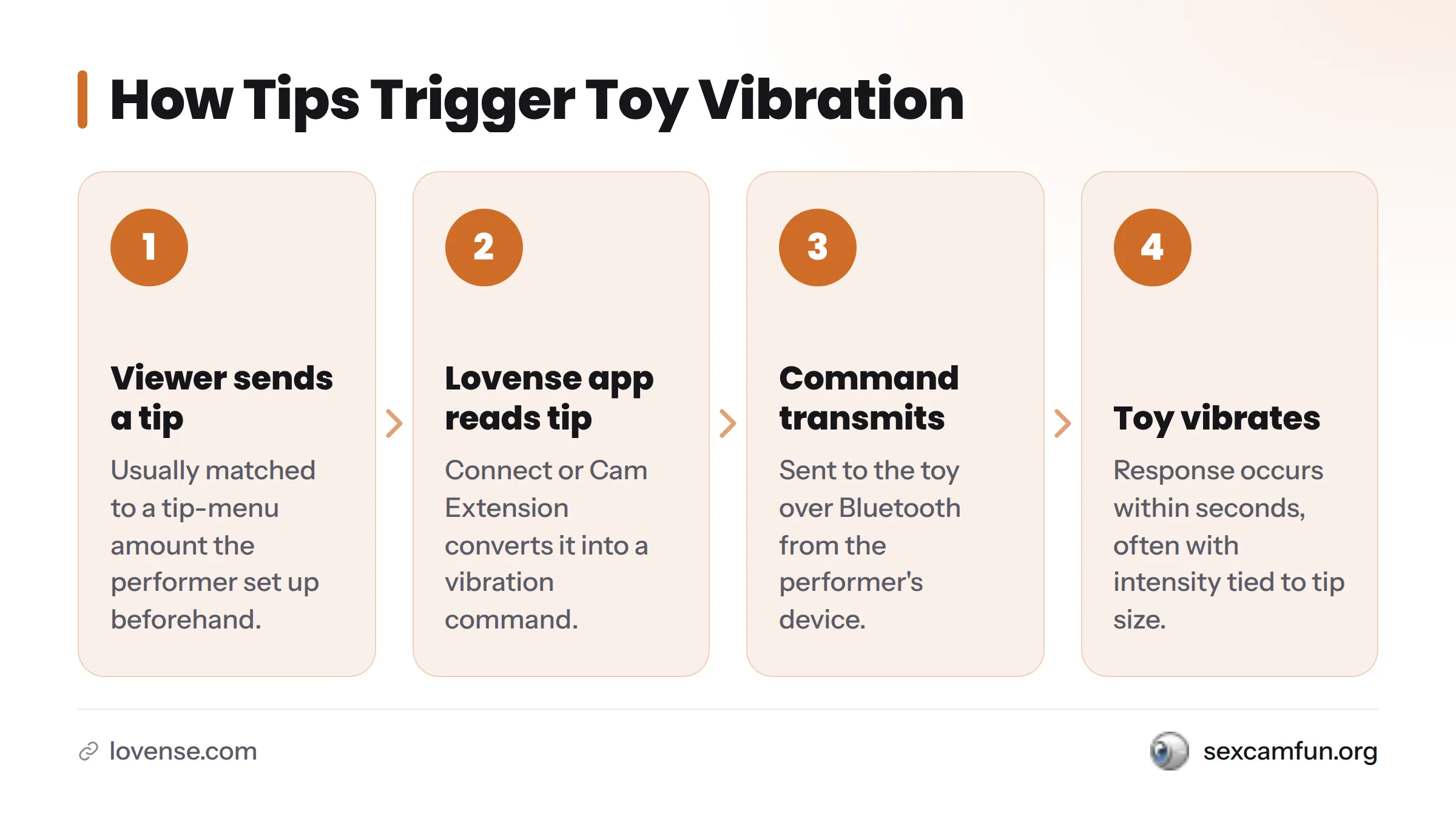
The flow: Tip → App Signal → Toy Vibration
- Viewer sends a tip (usually matched to a tip-menu amount)
- Lovense Connect or the Cam Extension reads the tip and converts it into a command
- The command transmits via Bluetooth to the toy
- The toy vibrates, often with intensity or pattern tied to tip size
The tip menu serves a purpose: it sets expectations. A performer might list five tokens for a short pulse and fifty for a sustained pattern, so viewers know what their tip actually triggers before sending it. According to Lovense’s own documentation, the Connect app syncs toy response with tip and chat activity on supported platforms, creating the technical foundation for instant-feeling interaction rather than noticeable delay.
Bluetooth is the connection method in nearly every case. Lovense toys pair with a phone or tablet running the Connect app rather than plugging into a computer. That pairing happens once before the broadcast starts and remains active throughout the show.
What You Need for Interactive Toy Shows
From a viewer’s perspective, you don’t need to own any hardware to watch and participate. The requirements below apply mostly to the performer, but understanding them explains why some rooms support interactivity and others don’t.
- A compatible Lovense toy worn or used by the performer
- The Lovense Connect app or Cam Extension installed on the performer’s device to bridge toy and platform
- A mobile device with Bluetooth enabled for the toy to pair with
- A cam platform that supports Lovense’s tip-to-toy integration, since not every site offers this feature
- A stable internet connection on both ends, since lag between tip and vibration breaks the interactive experience
As a viewer, you typically need only an account on a platform that supports interactive shows and enough balance to tip. Setup specifics vary by platform, since each site implements the Cam Extension connection slightly differently. Treat any given room’s tip menu as the accurate source of truth for what a specific tip triggers in that moment.
Ready to browse interactive toy rooms? SexCamFun’s private HD cams with interactive control are a straightforward starting point without the guesswork of finding which performers have toys connected.
How to Identify Interactive Toy Rooms
Most guides skip this part, but it’s genuinely useful before you tip anything. On SexCamFun’s directory, performers broadcasting with a connected interactive toy carry a visible label or icon on their room thumbnail and inside the room, distinct from performers running a standard broadcast. That label signals before you open the room whether tipping will trigger a toy response.
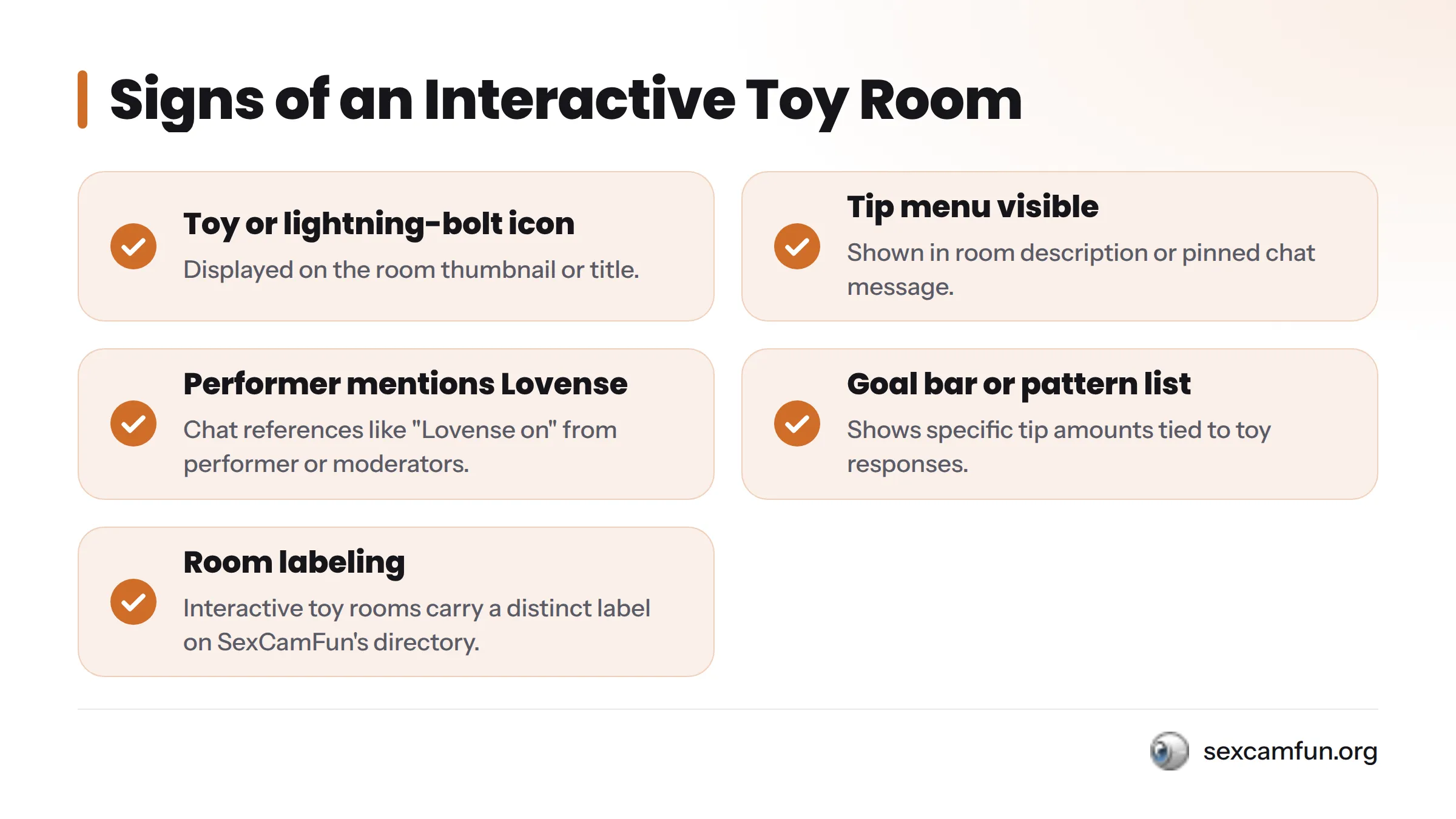
When browsing any directory, look for:
- A toy or lightning-bolt icon on the thumbnail or room title
- A tip menu displayed in the room description or pinned chat message
- Chat mentions of “Lovense on” or similar language from the performer or moderators
- A visible goal bar or pattern list tied to specific tip amounts
Without these signals, assume it’s a standard show. Tipping still supports the performer, but it won’t trigger a toy response. This labeling convention exists so viewers don’t have to ask or guess, making it the clearest way to identify an interactive cam show from the start.
Safety and Privacy Fundamentals
These are practical habits worth developing before any interactive session. This isn’t medical or legal advice, just practical sense.
Account security:
- Use a unique password for your cam platform account that differs from passwords for email or banking logins
- Enable two-factor authentication wherever the platform offers it
- Avoid linking payment methods you don’t want tied to a username visible in chat
Privacy practices:
- Don’t share identifying personal details in public chat, even casually
- Be cautious with third-party browser extensions claiming to “enhance” a cam platform; not all are trustworthy
- Review a platform’s privacy settings before your first tip
General consumer guidance from the Federal Trade Commission’s password and account security article applies here just as it does anywhere else online.
On consent: interactivity doesn’t remove the need for clear boundaries. Performers set their own tip menus and pacing intentionally, and respecting those limits is what makes an interactive show work for everyone. A tip triggers a toy response because the performer chose to offer that trade, not because a viewer is entitled to any particular reaction.
Lovense Cams Versus Standard Webcam Shows
The core difference is control. A standard show is performer-led; an interactive one gives viewers a direct, physical lever.
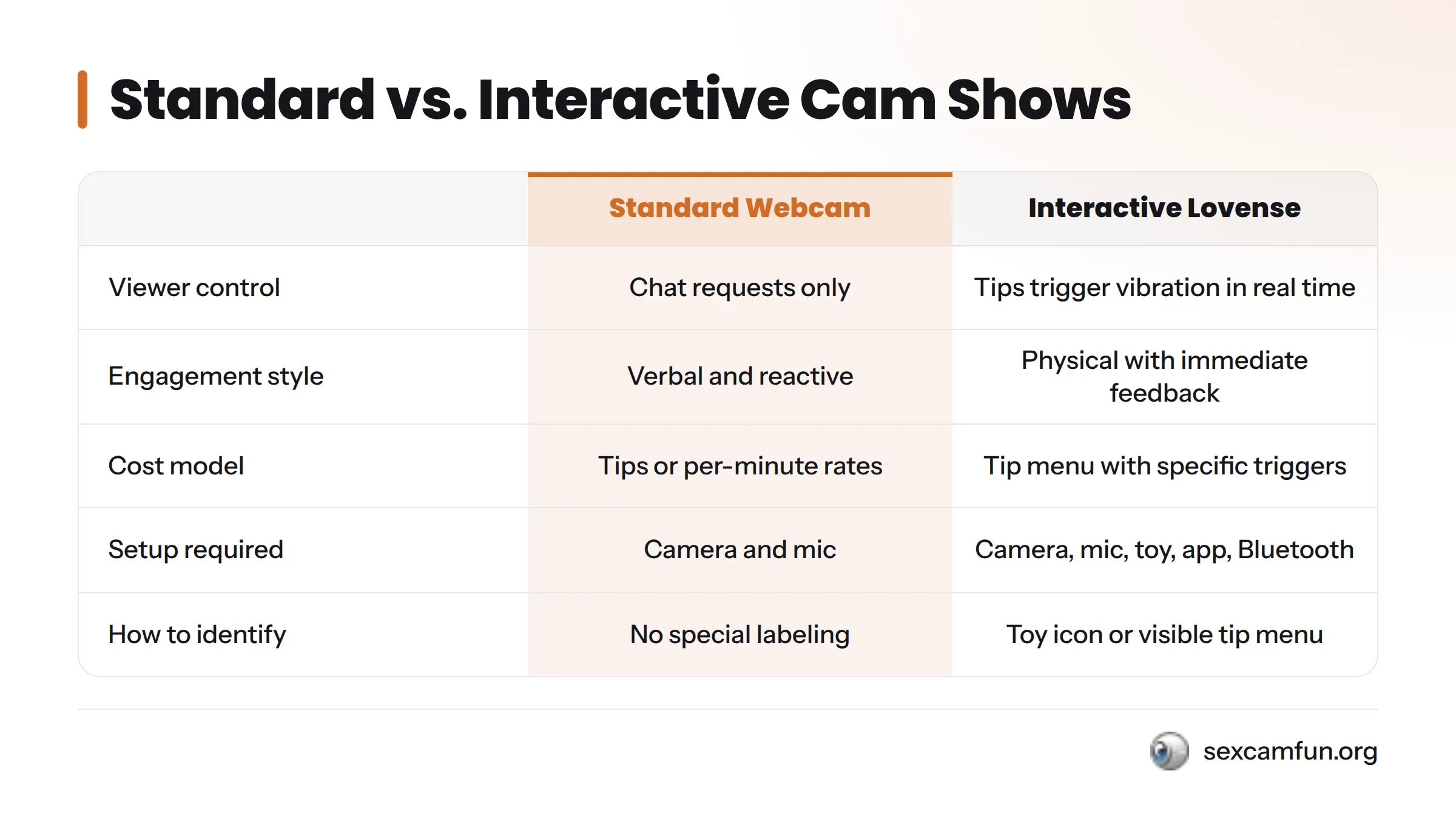
| Factor | Standard Webcam Show | Lovense / Interactive Cam Show |
|---|---|---|
| Viewer control | Chat requests only; performer decides pacing | Tips directly trigger toy vibration in real time |
| Engagement style | Verbal and reactive | Physical with immediate feedback loop |
| Typical cost model | Tips or per-minute private rates | Tips tied to a specific menu, often layered on standard rates |
| Setup required | Camera and mic | Camera, mic, toy, Connect app or Cam Extension, Bluetooth pairing |
| How to identify it | No special labeling needed | Room usually carries a toy icon or visible tip menu |
Neither format is objectively superior. A standard show can be plenty engaging, and some viewers prefer the more conversational pace. Interactive shows simply add a layer of direct cause-and-effect that many find more immersive, since the connection between a tip and a visible, physical result is immediate rather than implied.
Related Interactive Formats Worth Exploring
A Lovense cam is one format among several that blur the line between watching and participating. If you’re exploring this space, these related formats deserve attention:
- Cam2cam sessions, where both sides share video rather than just the performer broadcasting. SexCamFun’s cam2cam basics page covers how this format works.
- Private shows, the one-on-one format where interactive toys are frequently layered in. The guide to cam2cam private sessions explains what to expect from booking a private room.
- Virtual sex concepts, a broader category of remote intimacy that encompasses interactive toys. See virtual sex explained for the larger picture.
- VR webcam shows, which add a visual headset layer on top of or alongside toy interactivity. Virtual reality webcam shows covers that hardware side separately, as it’s distinct from toy connectivity.
Frequently Asked Questions
What does “Lovense cam” mean? It refers to a live cam show where a performer’s Bluetooth-connected Lovense toy reacts to viewer tips, not a specific hardware product.
Is a Lovense cam the same as the Lovense Webcam? No. The Lovense Webcam is a physical 4K camera product. A Lovense cam show is the interactive broadcast experience, which may or may not use that camera.
How do tips control the toy? A tip is read by the Lovense Connect app or Cam Extension on the performer’s device, converted into a vibration command, and sent to the toy over Bluetooth, usually within seconds.
Do I need my own Lovense toy to watch? No. Only the performer needs the toy and the connecting app. Viewers need just an account and enough balance to tip.
How do I know if a room supports interactive toys? Look for a toy or lightning-bolt icon on the room thumbnail, a visible tip menu in the description or pinned chat, or the performer mentioning that their toy is active.
Is it safe to join an interactive show? Following standard account-security habits like unique passwords and two-factor authentication, plus avoiding identifying details in chat, covers most practical risk – the same precautions that apply to any live cam platform.
What’s the difference between a Lovense cam show and cam2cam? A Lovense cam show centers on toy interactivity triggered by tips. Cam2cam is about both parties sharing video feeds. The two can happen in the same session but describe different features.
Want to see interactive rooms in action rather than just read about them? Browse SexCamFun’s private HD cams with interactive control to find a toy-enabled room and watch the tip-to-vibration mechanic play out live, with the labeling conventions making it easy to spot which rooms actually support it.